Free Download Haryana Lightroom: Haryana DC Jobs Presets (2026)
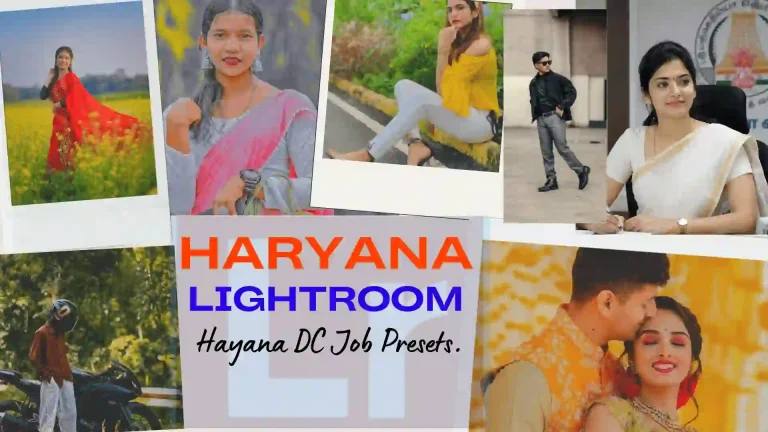
Haryana Lightroom presets are color grading presets built for the way light and color behave in Haryana: gold mustard fields in January, dust and haze along the Aravalli edge, red brick, marigold garlands and loud wedding clothes.
“Haryana DC Job presets” is a social-media name for the same kind of DC job style photo editing, and for AI portrait prompts. It is not a government job, a recruitment notice or a wage scheme.
11/25/2026
12.0.02
16.0
This guide gives you Haryana Lightroom free presets with the settings behind each look, install steps for phone and desktop, a fix list for the errors people hit most, and a short section for anyone who searched “DC job” looking for real work. No password, no DM, no sign-up ready to use haryana style presets.
| Preset | Best for | The look | Best season |
| Sarson Gold | Mustard fields, golden hour portraits | Warm yellows, soft greens | January to February |
| Kohra Morning | Winter fog, hills, quiet fields | Low contrast, cool-neutral, airy | December to January |
| Haveli Brick | Old brick, forts, heritage walls | Deep reds and browns, muted sky | October to March |
| Wedding Red and Gold | Baraat, pheras, haldi, family groups | Rich reds, glowing marigold, clean skin | Wedding season |
| Village Portrait | Documentary and candid faces | Earthy, honest, natural skin | Year-round |
| Aravalli Dust | Dry south Haryana landscapes, travel | Warm matte, faded blues | February to June |
| Highway Teal | Green crops, roads, bike shots | Dark green-teal shadows, warm skin | July to October |
| Office Portrait | Indoor formal portraits (the “DC Job” look) | Clean, neutral-warm, sharp | Any |
If you came here from a Reel or a Pinterest pin, here is the short version. “Haryana DC Jobs presets” became a search term because the phrase sounds official and gets clicks. In practice it points to two things:
- Photo looks shared as Lightroom presets, usually a polished, cinematic portrait with warm skin and deep tones.
- AI prompts Haryana dc jobs presets prompt that you can paste into ChatGPT, Gemini or similar tools to turn a selfie into an office style portrait.
A preset is a saved set of Lightroom sliders. It is a starting point, not a repair. It cannot fix a blurry photo, a blown out sky or the wrong white balance. If a photo is too dark or too bright, change Exposure first, then judge the look. Skin tone is the one thing to check every time.
The settings below are written as starting ranges on a correctly exposed photo, so you can rebuild each look yourself in any version of Lightroom.
1. Sarson Gold: for mustard fields and golden hour
Sarson (mustard) blooms across Haryana in winter, with a strong belt through Rewari, Mahendragarh, Bhiwani and Sirsa. The problem is that phones and cameras often turn that yellow harsh and neon. This golden hour lightroom preset warms the frame, lifts the yellows gently and keeps petals from losing detail.
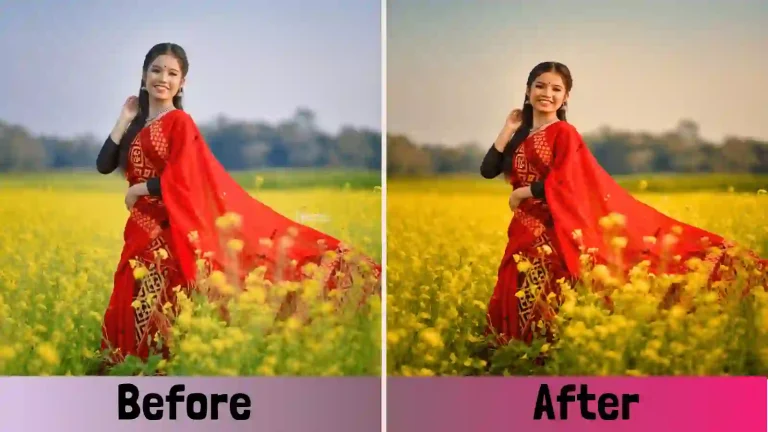
- Best for: fields, couples and portraits in low sun, 6 to 9 AM or the hour before sunset.
- Starting settings: Exposure +0.2 to +0.4; Contrast +10 to +20; Highlights −40 to −55; Shadows +20 to +30; a small warm shift in Temp; Vibrance +15 to +25. Color Mix: Yellow Saturation +10 to +25, Yellow Luminance +5 to +15, Orange Saturation +5 to +10. Clarity +5 to +10; Vignette −10 to −15.
- Watch out: if petals look flat, pull Yellow Saturation back. If skin turns orange, lower Orange Saturation.
2. Kohra Morning: for winter fog
Fog in December and January is beautiful and difficult. Most “moody” presets add contrast and clarity, which destroys it. This Lightroom Haryana preset keeps the haze.
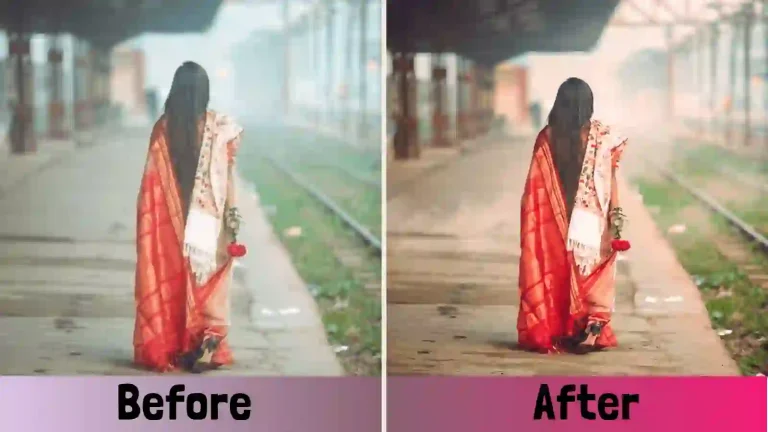
- Best for: fields, roads and hills at sunrise, such as Morni Hills near Panchkula.
- Starting settings: Exposure +0.1 to +0.3; Contrast −10 to −20; Dehaze 0 to −15 (do not add Dehaze); Highlights −20; Shadows +20; Blacks +10 to +20; Saturation −5 to −10; a slight cool shift in Temp. Color Grading: Shadows toward blue (hue around 210, Saturation 8 to 12), Highlights toward warm (hue around 45, Saturation 5 to 8).
- Watch out: adding Dehaze will remove the fog you are trying to keep.
3. Haveli Brick Haryana Presets: for old walls and heritage sites
A desi girl photo in front of red brick and sandstone look rich in warm light but can turn muddy in midday sun. This preset deepens reds and browns and keeps the sky from going loud.
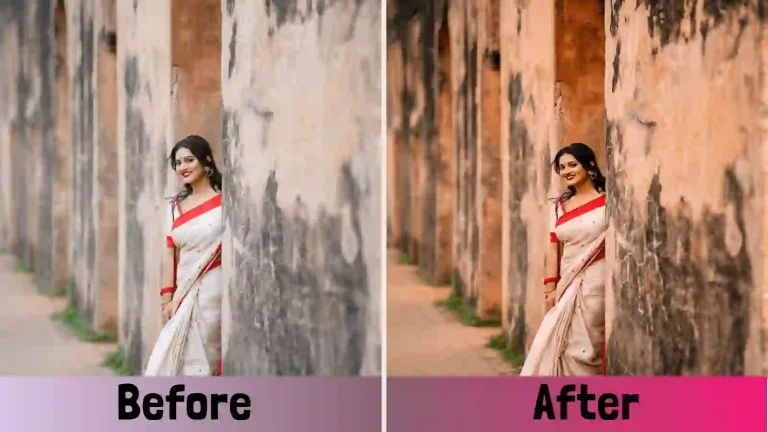
- Best for: the Firoz Shah Palace complex in Hisar, Pinjore Gardens near Panchkula, old havelis and village gates.
- Starting settings: Contrast +15 to +25; Highlights −30; Shadows +15; Texture +10 to +20; Temp a little warm. Color Mix: Red Saturation +5, Orange and Red Luminance −5 to −15, Blue Saturation −15. Grain +8 to +12.
- Watch out: brick reds can spill into skin. Use a subject mask to protect people.
4. Wedding Red and Gold: for baraat, pheras, haldi and Holi
Haryana culture weeding preset is quite demanding these days and very popular in girls to enhance their bridal look, Wedding colors fight each other: red lehengas, marigold garlands, turquoise dupattas, sparkle and mixed lighting. The goal is rich color without turning everyone orange.
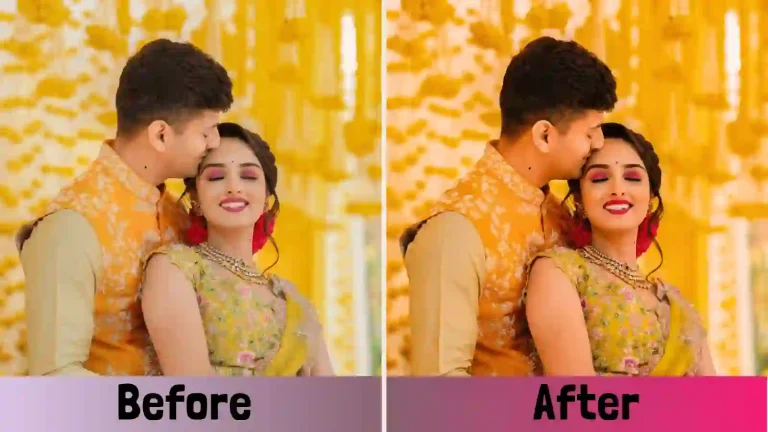
- Best for: ceremonies, couple portraits, family group shots.
- Starting settings: Exposure +0.1 to +0.3; Highlights −25 to −35; Shadows +15 to +25; Vibrance +10 to +20; Saturation 0 to +5. Color Mix: Red Saturation +10 to +20 with Red Luminance +5, Yellow Saturation +10 to +20 for marigold, Orange Luminance +5 to +10 to keep skin bright, Green Saturation −10.
- Watch out: set white balance on a neutral first. Under mixed light, use a subject mask for skin.
5. Village Portrait: for honest, candid faces
This one is for elders, farmers, children and everyday life and also for Haryana landscape wallpapers, where over-editing looks fake fast.
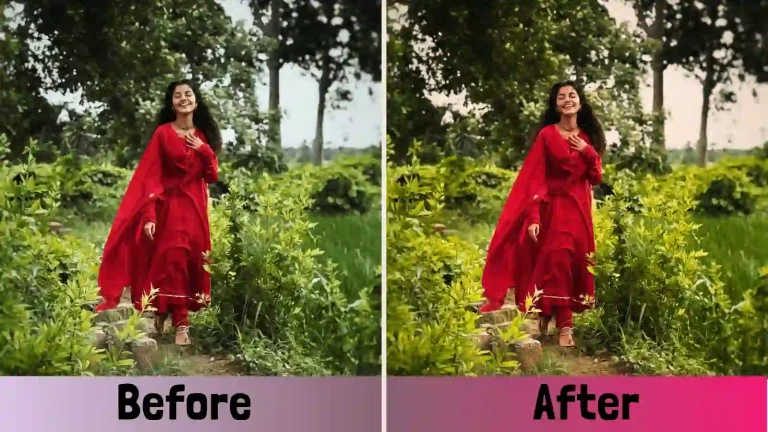
- Best for: candid and documentary portraits, pagdi and dhoti-kurta, charpai and courtyard scenes.
- Starting settings: Contrast +10 to +15; Highlights −20; Shadows +15 to +25; Vibrance +8 to +12; Saturation −3 to −8; a gentle warm shift. Texture +10 to +15 on the background, less on skin. Vignette −10 to −20; Grain +10 to +15.
- Watch out: do not over-sharpen skin. Mask the face and soften Texture.
6. Aravalli Dust: warm matte for dry landscapes
South Haryana has a different palette from the green north: dust, scrub, pale sky and rock. A warm matte look suits it. Use this free Lightroom Haryana preset and edit your photo in no time and download in HD.
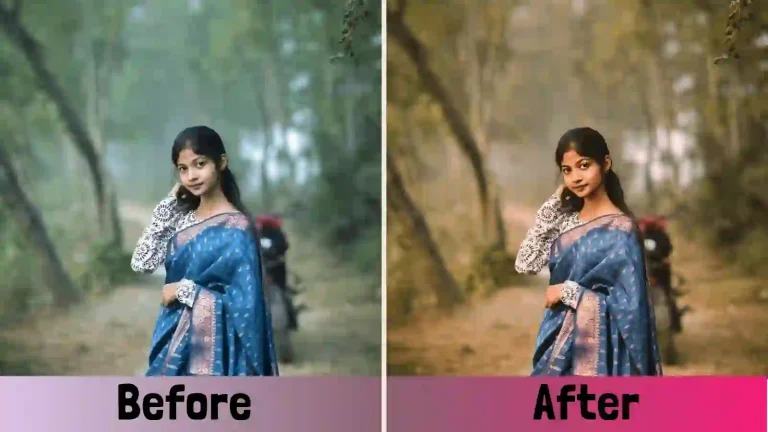
- Best for: Aravalli foothills near Rewari, Mahendragarh and Nuh, travel shots, editorial portraits. Can be also use for night flash Lightroom preset.
- Starting settings: Contrast −10 to −20; Highlights −30; Shadows +25; Blacks +15 to +25 for the matte lift; Saturation −5 to −10; Temp warm. Color Mix: Blue Saturation −25 to −35, Aqua −15, Green −15. Grain +15 to +20.
- Watch out: lifted blacks look muddy in harsh noon sun. Lower Exposure first.
7. Highway Teal: green crops and road shots
The popular green-teal Reel look works best when skin stays warm. This version protects it. This Haryana Lightroom preset is very popular in Gen-Z in 2026 and also will be in trending in 2027
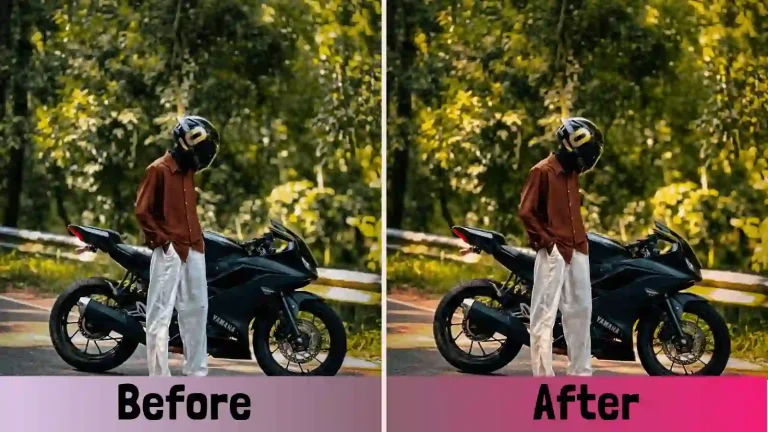
- Best for: bike and car shots, paddy and sugarcane fields, monsoon greens in Karnal and Kurukshetra.
- Starting settings: Contrast +25 to +35; Highlights −40; Blacks −20 to −35; Temp slightly cool. Color Mix: Green Saturation +10 to +25, Green Luminance −10 to −20, Aqua Saturation +10 to +20, Orange Saturation +8 to +12. Color Grading: Shadows toward teal (hue around 180 to 190), Highlights warm (hue around 40 to 50).
- Watch out: skin going green. Nudge Orange Hue slightly toward yellow and mask the person if needed.
8. Office Portrait: the clean “DC Job” look in Lightroom
This is what the trend looks like when you grade a real photo instead of generating AI photo: a sharp, neutral-warm indoor portrait with natural skin.
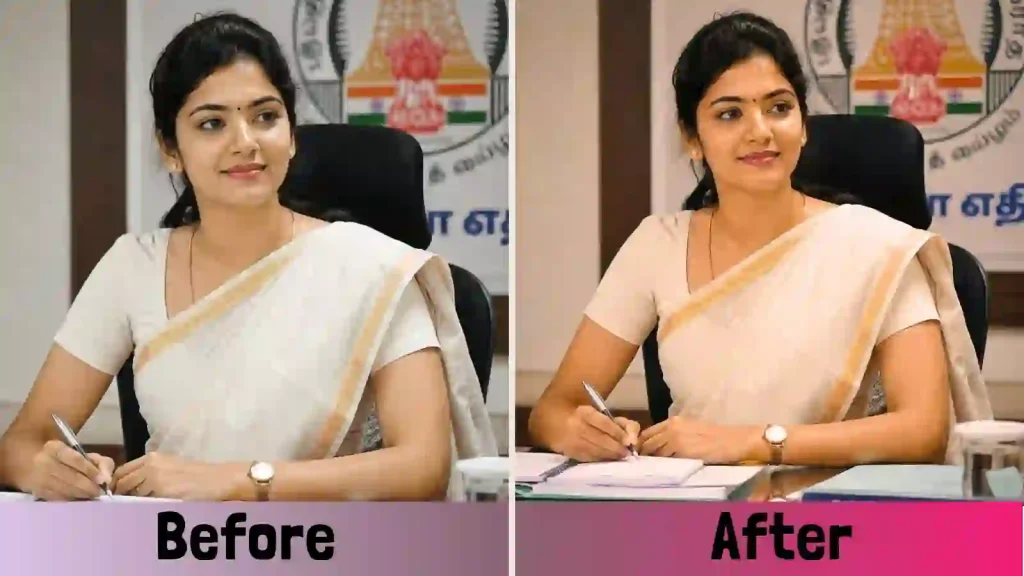
- Best for: formal and professional portraits, DP photos, interview-style headshots.
- Starting settings: Exposure +0.2 to +0.4 (indoor photos are often underexposed); Contrast +8 to +15; Highlights −20; Shadows +15; Temp neutral to slightly warm; Vibrance +5 to +10; Vignette −10. Detail: Sharpening 40 to 55 with Masking 40 or higher; Noise Reduction 15 to 25 for indoor noise.
- Watch out: tube lights add a green cast. Move Tint slightly toward magenta and set white balance on skin.
This preset changes color only. It does not add any official emblem, ID or badge, and you should not use it to pass a photo off as an official one.
Most problems come from one mistake: people save a preview image instead of the DNG file. Follow this order.
- Download the file with the download button, not by long-pressing a picture. The file should end in .dng.
- Open Lightroom APK Latest version, tap Add Photos, and pick the DNG from your android phone. If the picker offers a file-type filter, hide JPG, PNG and video so only DNG files show.
- Open the preset photo, tap the three dots at the top right, and choose Copy Settings. Keep the settings you want to transfer, then confirm.
- Open your own photo, tap the three dots again, and choose Paste Settings.
- Adjust Exposure and white balance. Check skin before you export.
If you shared the file from the Gallery app and it behaved strangely, add it again through Lightroom’s own picker. Check the photo’s Info panel: the file type should read DNG.
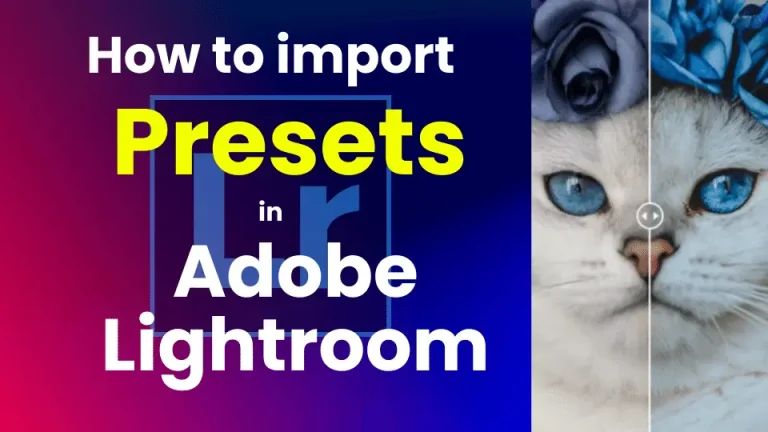
An XMP file is not a photo, so tapping it will not open it. Import it through the presets menu:
- Lightroom Mobile: Presets, then the three dots, then Import Presets.
- Lightroom (desktop and web): Edit, then Presets, then the three dots, then Import Presets.
- Lightroom Classic: Develop module, Presets panel, the plus icon, then Import Presets.
Adobe changes what free and paid plans include from time to time, so check Adobe’s Lightroom help page for your version. You can use Lightroom mod APK for unlock paid features for free.
Preset ka file .dng hona chahiye, photo (.jpg) nahi. Lightroom Mobile kholo, Add Photos se DNG add karo, teen dots dabao, Copy Settings karo. Phir apni photo kholo, teen dots dabao, Paste Settings karo. XMP file ho to Presets, teen dots, Import Presets se add karo. Agar kaam na kare to download button se dobara file lo, gallery se share mat karo.
| What you see | Likely cause | Fix |
| “Unsupported file” when tapping an XMP | XMP is not a photo | Import through Presets, then Import Presets |
| Paste Settings does nothing | Settings were not copied, or copied from a JPG preview | Re-download the DNG and copy again |
| Photo looks unchanged | The preset photo was a JPG or nothing was selected in Copy Settings | Use the DNG and keep all settings ticked |
| Photo looks too bright or too dark | Your exposure differs from the preset photo | Change Exposure by 0.3 to 0.7, then Highlights |
| Skin looks orange or green | Color Mix catches skin tones | Reduce Orange Saturation, or mask the person |
| ZIP asks for a password | Some sites lock files behind videos or DMs | Use a source with open downloads; Android’s Files app or ZArchiver can extract ZIPs |
| Grain or color noise in dark areas | Low-light photo | Raise Noise Reduction in Detail |
| Colors look different on Instagram | Platform compression | Export as a high-quality JPG in sRGB |
The same preset behaves differently across the year. A rough guide:
- Late October to November: smoke and haze often sit over north India and the NCR. Expect flat, warm-grey light and lower contrast.
- December to January: kohra (fog). Use Kohra Morning and keep Dehaze off.
- January to February: mustard bloom. Shoot early or late for Sarson Gold.
- March to April: green wheat, then harvest. Dust and harder light by April.
- July to September: monsoon greens. Highway Teal works well.
| Place | Main PIN | What to shoot | Suggested preset |
| Kurukshetra | 136118 | Brahma Sarovar, Jyotisar, the winter Gita Mahotsav | Village Portrait, Sarson Gold |
| Karnal | 132001 | Karna Lake, fields and highways | Highway Teal |
| Panipat | 132103 | Kabuli Bagh Mosque, Ibrahim Lodi’s tomb | Haveli Brick |
| Hisar | 125001 | Firoz Shah Palace complex | Haveli Brick |
| Rohtak | 124001 | Tilyar Lake, local markets | Village Portrait |
| Gurugram | 122001 | Cyber Hub, Sultanpur National Park | Office Portrait, DC jobs Preset |
| Faridabad | 121001 | Surajkund Mela (usually February), Badkhal Lake | Wedding Red and Gold |
| Panchkula | 134109 | Pinjore Gardens, Morni Hills, Tilokpur | Kohra Morning, Haveli Brick |
| Yamunanagar | 135001 | Kalesar National Park | Kohra Morning |
| Rewari | 123401 | Aravalli edge, mustard belt | Aravalli Dust, Sarson Gold |
| Sirsa | 125055 | Wheat, mustard and cotton belt | Sarson Gold |
Presets are fast templates, but understanding the steps makes every edit better.
- Fix exposure and white balance first.
- Pull Highlights down and lift Shadows to protect detail.
- Set the mood with Temp, Tint and Vibrance.
- Use Color Mix to shape specific colors: yellows for mustard, reds for weddings, greens for crops.
- Add Color Grading for depth: cool shadows and warm highlights are the classic split.
- Finish with Texture, Vignette and light Grain, then check skin tones last.
A prompt is text you paste into an AI image tool. A preset is saved Lightroom settings you apply to your own photo. They are different tools that can work together: generate an image, then grade it in Lightroom so a set of photos looks consistent.
A safe starting prompt:
Edit the uploaded photo into a cinematic office portrait. Keep my face, hairstyle and skin tone exactly the same. Formal blazer and white shirt, warm desk lamp, shallow depth of field, natural skin texture, 4:5 vertical. No logos, no emblems, no readable text.
Three habits matter. Ask the tool to keep your face the same. Request a vertical format such as 4:5 for Instagram. And leave out government emblems, name plates and ID cards, which can make an image look official when it is not.
Before you upload a photo, read the tool’s privacy and data policy, and do not upload other people’s photos without their permission. Label AI-generated images as AI-generated.
A common reply on photo forums is that presets are pointless and you should develop your own style. That is partly right. A preset will not give you taste, and free ones vary a lot in quality. Where they help is speed and consistency: one starting point across a whole shoot, or a beginner learning what each slider does by studying the settings. Treat a preset as a draft and adjust it.
- Feed posts: 4:5 portrait, 1080 × 1350 pixels.
- Reels and Stories: 9:16, 1080 × 1920 pixels.
- File: JPG, high quality, sRGB color space.
- Export from Lightroom after editing, and avoid re-saving through other apps.
Frequently asked questions
What are Haryana Lightroom presets?
They are saved Lightroom settings tuned for Haryana’s light and colors, such as mustard fields, fog, dusty Aravalli landscapes and red-gold wedding clothes. You apply one to a photo, then adjust exposure and skin tone to suit it.
What are Haryana DC Job presets? Is it a real job?
It is a social-media trend name for a cinematic photo look and for AI portrait prompts. It is not a government job, recruitment notice or wage scheme. For real jobs, use the Haryana Staff Selection Commission, the Haryana Public Service Commission or HKRN.
What does “DC rate” mean in Haryana?
It refers to the wage rates that district Deputy Commissioners once set for contract staff. The state later created Haryana Kaushal Rojgar Nigam to handle contract hiring and moved to corporation wage rates, according to Drishti IAS.
Are these presets free, and do I need a password?
Yes, they are free, and no password, DM or sign-up is needed. If another site asks you to watch a video to find a ZIP code or send a message, that is a gate, not a requirement of Lightroom.
Preset kaise download aur use karein?
Download the DNG with the download button, add it in Lightroom Mobile, tap the three dots, choose Copy Settings, open your photo and choose Paste Settings. Do not save the preview image or share the file through the Gallery app.
How do I import XMP presets?
In Lightroom Mobile, go to Presets, tap the three dots and choose Import Presets. On desktop, use the Presets panel and its Import option. An XMP file cannot be opened like a photo.
Do I need Lightroom premium?
Adobe Lightroom plans change, so check Adobe Lr help page for your version. You can Use Lightroom premium unlocked for free access to Lightroom premium features. Copy and paste of settings from a DNG is the method most free-app users rely on.
Why is my preset not working or showing “unsupported”?
Usually you opened an XMP like a photo, copied settings from a JPG preview, or downloaded the wrong file. Re-download the DNG, copy its settings and paste them onto your photo. Check that the file ends in .dng.
Why does my photo look different from the preview?
Previews are shot under different light and exposure. Adjust Exposure, Highlights and white balance on your own photo first. Skin tones also need a final check, since every preset changes color.
Which preset is best for mustard fields, weddings and fog?
Sarson Gold for mustard fields, Wedding Red and Gold for ceremonies, and Kohra Morning for foggy winter mornings. All three work best on well-exposed photos.
How do I stop skin turning orange or green?
Open Color Mix and reduce Orange Saturation, then nudge Orange Hue slightly. For stubborn cases, add a mask on the person and reduce the effect only there.
What is the difference between a preset and an AI prompt?
A preset is saved Lightroom settings applied to your own photo. A prompt is text that tells an AI tool to generate or restyle an image. A preset adjusts your photo; a prompt can create a new one.
How do I use a Haryana DC Job prompt in ChatGPT or Gemini?
Upload a clear, well-lit photo, paste the prompt, and ask the tool to keep your face the same and to produce a 4:5 vertical image. Leave out official emblems and ID cards, and check hands and text in the result.
Is it safe to upload my photo to AI tools?
It depends on the tool. Read its privacy and data policy, avoid uploading anyone else’s photo without consent, and do not upload documents or IDs. When in doubt, use a photo you are comfortable sharing.
Are presets worth it?
They are useful for speed and consistency, and for learning how sliders work. They are not a substitute for good exposure or your own style. Use them as a starting point and adjust.